Download Personal Alarms (5.90MB)
Personal Alarms is a lightweight sticky note reminder program. One time or recurring reminders are displayed at startup. Sticky note reminders are displayed from the bottom right of your primary display, locations build from the bottom right to the top left.
When reminders are displayed, the following controls are available:
- -Delete (only on one-time reminders) - Deletes from the database.
- -Reschedule (only on recurring reminders) - Changes the next alarm date.
- -Snooze - Makes no changes. Reminder will be shown again next time.
- -Edit - Opens the program interface, allowing you to make changes.
Alarms from previous days that have not been rescheduled or deleted will show "Snoozed:" in the reminder text.
The following controls are available for scheduling recurring reminders:
- -Recurs weekly, monthly, yearly
- -Recurs every (1-12) weeks, months, or years
- -Show alarm (0-30) days in advance (also available on one-time reminders)
Here are a few things that set this apart from other software or services that provide the same functionality:
- -Lightweight. The application is only 909KB. A database of 30 reminders is approximately 3KB.
- -After the day's reminder(s) are closed, the application closes completely, ending all memory usage.
- -If no reminders are shown, the application closes immediately, ending all memory usage.
- -Reminders are by day, not time-specific.
There is a very minimal interface, shown below:
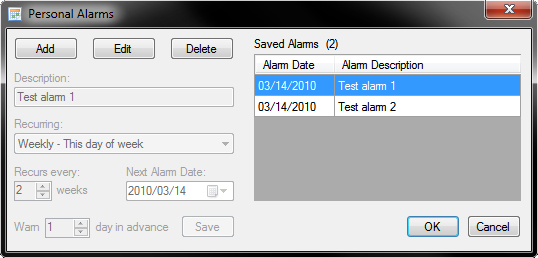
Shortcuts are placed in the current user Start Menu > Programs and Current User > Startup folders.
System Requirements
.NET 3.5
Windows XP, Vista, 7
32bit and 64bit versions supported
Other Information
Visit the Software page for more downloads from The James Machine.